
WORKFLOW / WEB DESIGN PROCESS
From understanding your business to a website that fits it.
We start by working out who the website serves and what it should help them do, then confirm the visual direction, the key pages, and the finished site with you. You don’t need to write a design brief. Bring what you have, and we’ll turn it into questions, samples, and pages you can react to.
Read the thinking behind these choicesUnderstand your business
Who is the website for, and what should it help them do?
We start with your business, not a template. The structure of the website follows real goals, which cuts down rework later.
- What we do
- Review your current website, business description, brand materials, and reference sites. We work out who the site serves, what they need to know, what you want them to do, and which pages and features are in scope.
- What you’ll see
- A short project summary, an initial page and content plan, and a list of what we still need from you.
- What we ask of you
- Check the business facts, tell us what to keep and what to improve, and confirm the scope and the main goal.
- Payment
- We schedule the work once your deposit is received. The split and the refund conditions before work starts are in our Terms of Service.
Once you confirm: we can both say what the website is for, and anything that could affect a key feature has a follow-up plan.
Find a visual direction
What does “warm, simple, professional” actually look like on a page?
Words like these mean different things to different people. So instead of describing a look, we show you two visual directions to compare side by side.
A visual direction is a set of samples: a color palette, headings and body text, photo style, buttons, and a few page sections together. In the industry it is often called a style tile.
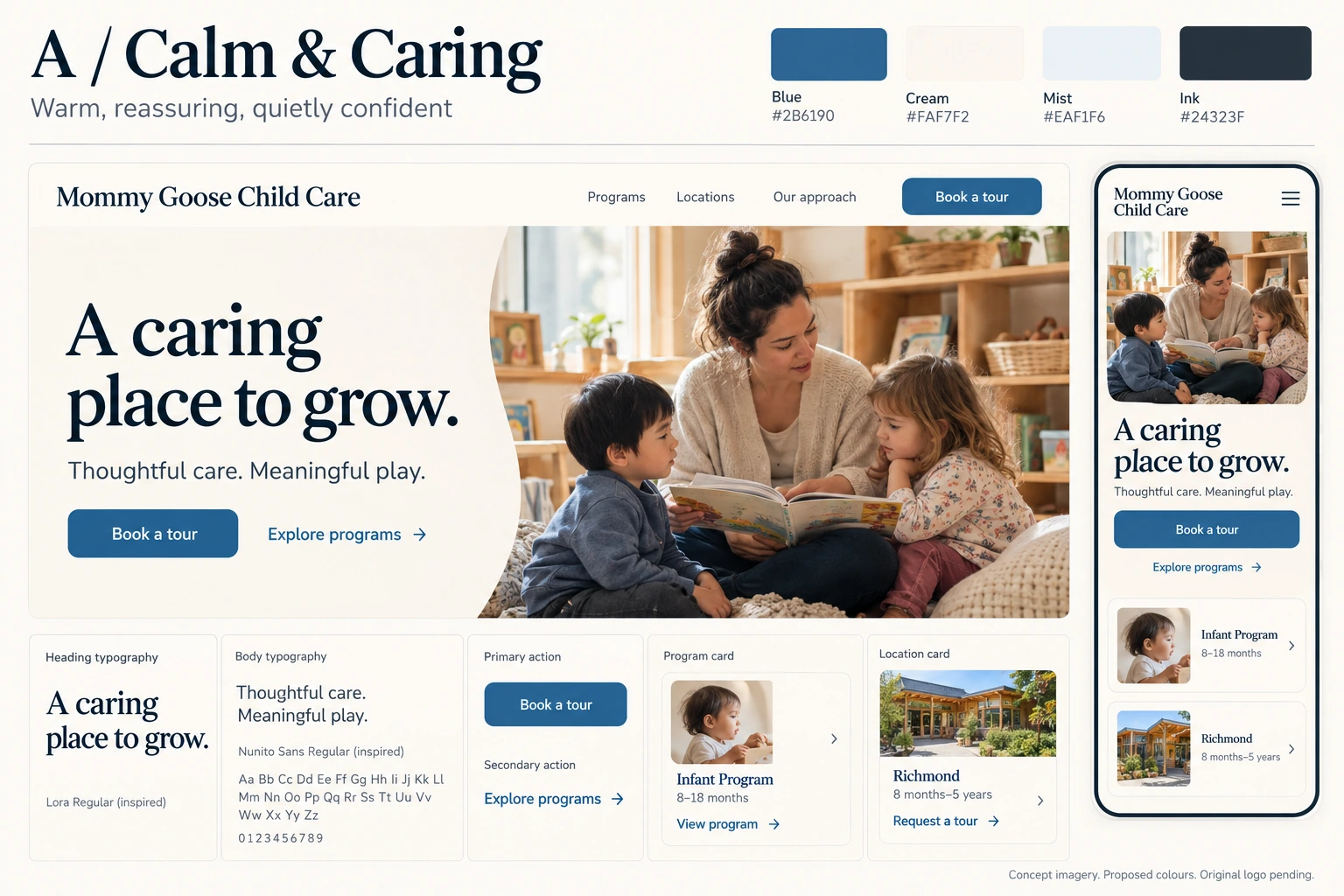
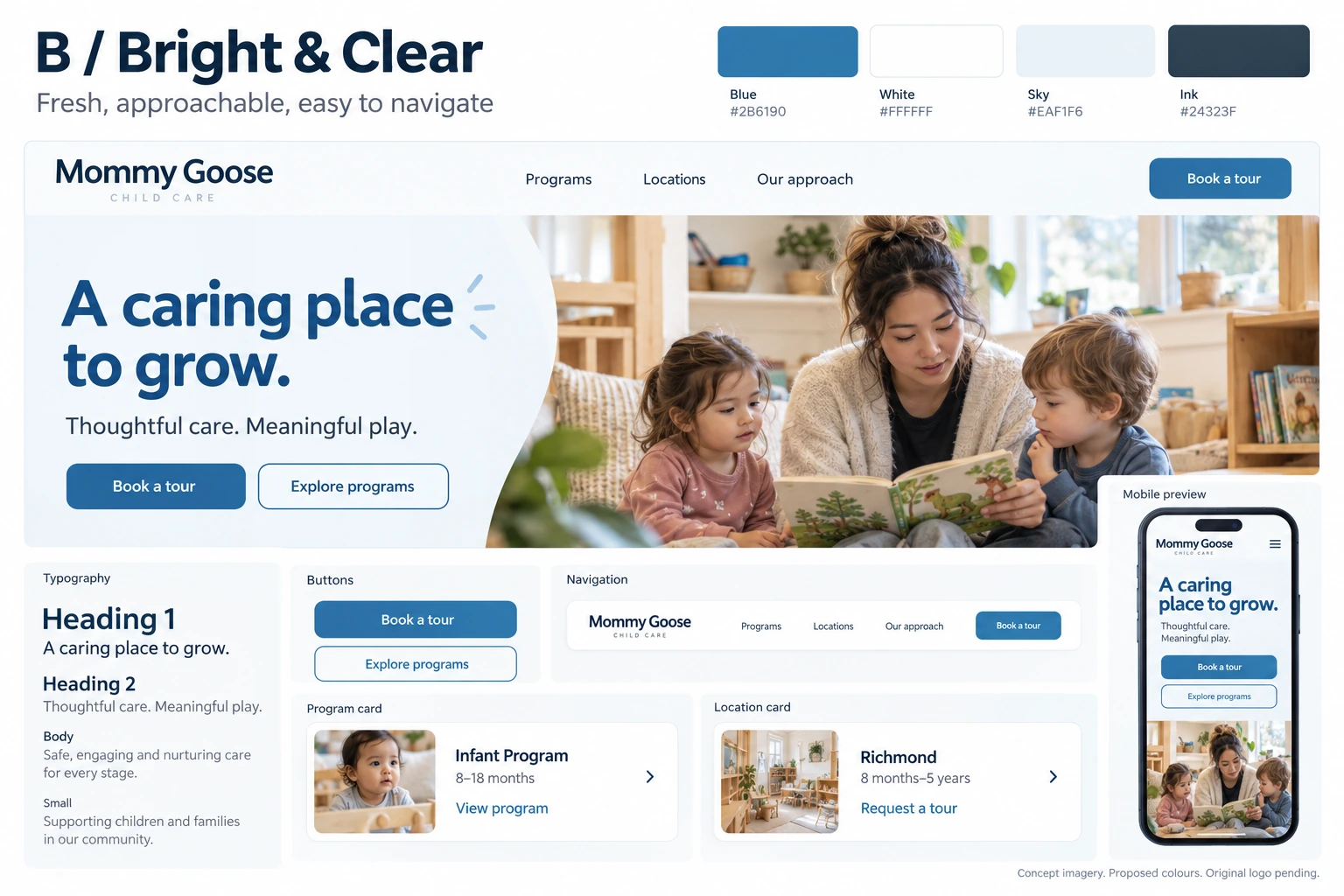
- What we do
- Study what works in the reference sites you like, then combine that with your brand and content to prepare two visual directions (v1 and v2), each with its own reasoning.
- What you’ll see
- The two directions side by side: color palette, type, photo style, buttons, and a few page sections.
- What we ask of you
- Choose one, tell us what to keep and what to change, and confirm the brand and photo information we may use.
- How the rounds work
- We adjust your chosen direction within reason and present v3. After v3 comes the final version, which guides every page. Adjustments beyond that may incur extra fees, billed by the hour at US$160. Time spent on communication and meetings counts as working time. Each change or service is billed at a minimum of 1 hour.
Once you confirm: one clear direction, a list of specific adjustments, and a record of anything still open.
Core pages
Does the direction still work with real content on real pages?
Before we extend anything to the whole website, we design the pages that best represent it, with real content and a phone layout.
Which pages count as core depends on the project. A child-care center might use the home page, a location page, and the about page. Another business might choose a service page, a product list, or a booking page.


- What we do
- Plan the page structure, the order of information, and the main paths a visitor takes. We design core pages that represent different kinds of content first, then complete the phone layout and the key interactions.
- What you’ll see
- Page structures or wireframes, representative page designs, and how reading and actions work on a phone. Pages are delivered as HTML you can open in any browser, not as design-tool files. The review format depends on the project.
- What we ask of you
- Check the copy and photos, and review the order of content, the brand feel, what is emphasized, and the contact or booking path.
Once you confirm: the content, look, and main paths of the core pages are settled, and important feedback has been handled.
The whole website
How do the other pages keep the same feel and still work?
We turn the colors, text hierarchy, layouts, and interactions you approved into reusable rules and components, then use them to complete the pages in scope. For you, that means a consistent website, and a clear basis for adding pages later.
- What we do
- Apply the approved rules to the remaining pages in scope. Each page keeps the structure that suits its own content.
- What you’ll see
- A preview of the whole website, and how new pages follow the core pages. Where it helps, a set of sample buttons, text styles, and sections.
- What we ask of you
- Check the remaining business content and review the important inner pages. If you add pages or features, confirm the scope and timing with us.
Once you confirm: the pages and features in scope are in a version you can check, and differences between the design and the website are recorded and handled.
Review and real use
Is the finished website accurate, true to the direction, and actually usable?
We check the website against what you approved, and we check it the way a visitor uses it. A prototype, an external link, and a real business connection are different things, and we tell you which one you are looking at.
- What we do
- Compare the website with the approved design. Check reading on a phone and on a desktop, navigation, links, images, and the key business actions in scope. Fix important issues and check again.
- What you’ll see
- A preview link to a specific version, a list of content to verify, and how important issues were handled.
- What we ask of you
- Browse it like a real visitor, verify the content to be published, and confirm the final website. If there is a form or booking, confirm what happens once an enquiry arrives.
- Our checklist
- Content is correct. It reads well on a phone. Navigation works. The form reaches you. The main action can be completed. The form check applies only to forms that are in scope and connected.
Once you confirm: the key paths work, important issues are solved or have a clear plan, and you have approved the version to publish.
Launch and care
How does launch work, and who handles changes afterwards?
We launch only after you have approved the design direction and the finished website.
- What we do
- Publish once you have confirmed and the agreed conditions are met. Check the key pages and entry points on the live website, and set up maintenance and handover.
- What you’ll see
- The live website, how to reach us for updates and issues, and what SiteMonk Care covers.
- What we ask of you
- Confirm the content to publish, help with domain or account setup where needed, and tell us who receives and handles business enquiries.
- Payment and launch
- The remaining payment is due after you confirm the finished work and before launch, and we launch once it is received. After you confirm, the design work is complete. Later changes use the monthly work budget of your Care plan.
- Ownership
- You own your content and the finished website. However and whenever our work together ends, we hand over the complete source code.
Done when: the live website is reachable, the key flows work, and responsibility and contact points are clear.
How publishing, care, and handover workWorking together
You know the business. We turn it into a website.
- Start from what you have
- A logo, a short business description, your current website, usable photos, reference sites, and key service details. If something is missing, we list it and explain which gaps affect the next step. You don’t need everything before the first conversation.
- Each round asks one question
- Direction review: how does the brand feel? Page review: are the content and the path right? Final review: is the published version accurate, and does it work?
- Feedback that works
- Point to the page or place, describe what you notice, and say why you’d like it to change. We turn that into specific design actions. For example, “It doesn’t feel warm enough” leads to “Is it the photos, the background, or the text?”, and then a concrete adjustment that you confirm.
- Decisions on record
- After each round we record what you confirmed, what stays, what changes, and what is still open. We suggest one contact person on your side who collects feedback.
- Before and after you confirm
- Visual direction: v1 and v2, then v3 after reasonable adjustments, then the final version. Adjustments after that may incur extra fees at US$160 per hour. Time spent on communication and meetings counts as working time. Each change or service is billed at a minimum of 1 hour. Changes after launch use the monthly work budget of your Care plan.
- When things change
- For new business information, pages, or features, we explain the impact and the timing first, then bring them into the current scope or plan them for later. New features are quoted separately.
Each round asks one clear question, and every decision is written down.
Questions
Questions before we start.
- Can we start without full copy or brand materials?
- Yes. We start from what you have and map the gaps. Real business facts and anything we publish need your confirmation. Whether we can help with copywriting, photography, or brand work depends on the project scope, and we say so up front.
- I’m not a designer. How do I give feedback?
- Talk about specific pages and samples: what you notice, and why. You don’t need to give font sizes, layout settings, or technical solutions.
- What if neither direction feels right?
- We go back to your goals and the reasons behind your references, clarify, and adjust within reason in v3. After v3 comes the final version. Adjustments beyond that may incur extra fees, billed by the hour at US$160. Time spent on communication and meetings counts as working time. Each change or service is billed at a minimum of 1 hour. Changes after launch use the monthly work budget of your Care plan. We don’t offer unlimited revisions, and the scope is set in your written quote.
- How long does it take, and how many reviews will I join?
- It depends on the pages, the features, how ready your materials are, and how quickly feedback comes back. Simple projects can combine reviews. We explain the schedule at the start rather than quoting a fixed number of weeks. What affects timing most: how complete your materials are, how quickly feedback is gathered (one contact person helps), how many pages and features are in scope, and whether things like booking need to be connected.
- When do I see the phone version?
- At the core pages stage, and we keep checking it as the pages are built and again before launch.
- Do you use AI? Who is responsible for the result?
- Where we use AI, it helps with exploring and drafting. We are responsible for checking the content, the design consistency, and how things actually work, and we don’t deliver unreviewed generated output.
- Can I change things or add pages after launch? Who owns the source?
- Yes, through your Care plan. Larger features are quoted as add-ons. You own your content and the finished website, and we hand over the complete source code however and whenever our work together ends. What travels with the website is described under Workflow.
Not answered here? Tell us what you’re wondering about when you get in touch.